Komen Mobile App User Guide
The Komen Mobile App is a great fundraising tool to help you promote and manage your fundraising success or the event(s) you recently registered to join. The Komen Mobile App provides mobile fundraising tools for participants of the MORE THAN PINK Walk, Race for the Cure, 3-Day, DIY Fundraising, Pickleball for the Cure and VIPink events. This mobile app is available for both iPhone and Android users and allows you to do everything you can do in your fundraising center plus a few added extras from your own mobile phone.
Simply download the app from the Apple App Store or Google Play Store, log in and start fundraising for your event.


The mobile app allows you to:
- View, save and share your personalized fundraising QR code.
- Personalize your URL and update your personal page with your own story.
- Easily share your personal fundraising link, including adding it to your bio on TikTok or Instagram.
- View and manage your handy fundraising checklist.
- Deposit check donations you receive from donors.
- View your fundraising progress.
- View your event’s leaderboard.
- Easily ask for donations and thank donors through Facebook, LinkedIn, texting and email.
- Link your fundraiser to Facebook
- Add a photo to your personal page from your mobile phone’s image library.
- Manage notifications so you can be reminded and updated about the event.
- See event participants from across the country by viewing the Image Gallery.
- Monitor your fundraising as well as your team’s progress (Team Captains only).
- Personalize your URL and update your team page with your team story (Team Captains only).
- Reach out to your team individually or as a group (Team Captains only).
- Customize your team’s photo and story (Team Captains only)
A full user guide for the Komen Mobile App can be found here.
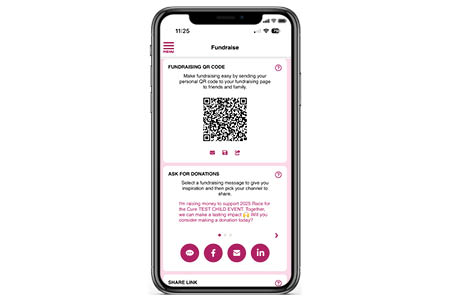
Fundraising QR Code
- Make your mobile fundraising easier by sharing your personal QR code with your peers! You can email it, save it, or share it directly from your mobile app.
Ask for Donations
- Select one of our prewritten messages to send to your friends and family to ask them to support your fundraising efforts. There is also an option to create your own message to send.
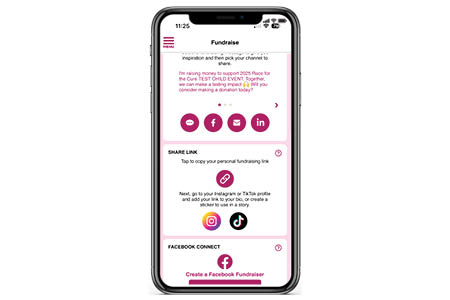
Share Link
- Share your personal or team fundraising link directly to your Instagram or TikTok bio or story.
Facebook Connect
- You can easily link your personal fundraising page to create a Facebook Fundraiser from the mobile app. This connection allows you to fundraise directly on Facebook and see all the money you raise on Facebook count towards your fundraising goal for this event.
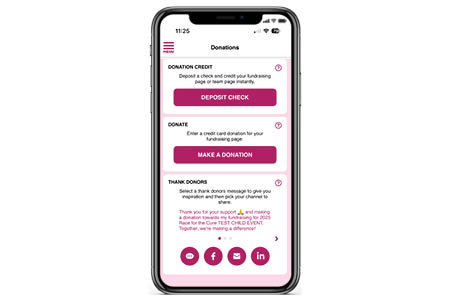
The Check Deposit option is a secure and easy service that allows you to scan checks using your device and electronically send the image for deposit to Komen. The money will appear on your personal or team fundraising goal instantly.
Note: Make sure your check is made out to Susan G. Komen.
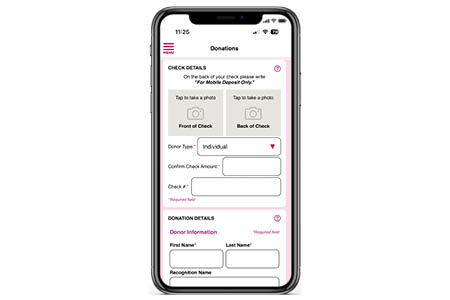
No. You do not need to mail in checks if you have deposited them through the mobile app.
On the Manage Page, you can:
- Create a Personal URL to make it easier to share your fundraiser with friends.
- Upload an image from your phone’s photo library to Update the Photo on your page.
- By clicking on the Edit My Story button you can edit your story and share why you fundraise for and participate in this event. Don’t forget to hit the save button when you’re done!
- By clicking on the View My Story button, you will be able to view your current Participant Center in your phone’s web browser and view all the changes you’ve made in the app.
- Team Captains ONLY: to edit your team page, click the Team button at the top of this section to edit your team page URL, update your team photo, and edit or view your team story.
Yes! The My Team Page and Recruit Page are available exclusively to Team Captains.
My Team Page With this section of the app, you can view and manage your team roster, monitor your fundraising progress, and contact your team members with ease.
Recruit Page With this section of the app, you can recruit new team members or invite former team members to return for this year’s event.
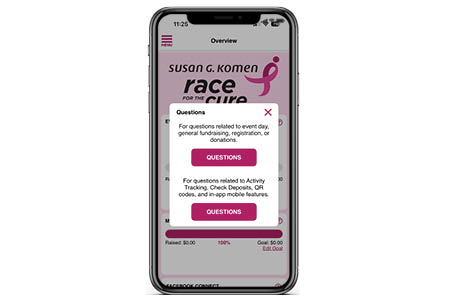
Yes. If you have any questions while using the Komen Mobile App, click on the Menu button in the top left corner of the app and select Questions from the menu. For questions related to event day, general fundraising, registration or donations, click the first Questions button. For questions related to in-app features, including Check Deposit and QR Codes, click the second Questions button.